
Niom Bistro is a restaurant in Wellington, New Zealand that hosts live music, bingo and quiz nights and takes table bookings through its website. When we first met them the site looked basic, the booking form collected a name and a phone number and emailed it to booking@niombistro.co.nz, and every event poster or weekly special meant a message to whoever last touched the site. That is the normal state of a small hospitality website, and it quietly costs bookings.
The problems, as the owner described them
- Bookings arrived as emails, so confirming a table meant typing a reply by hand — or forgetting to.
- Events happen every week; getting a poster onto the site was a developer task, so it often didn't happen until the event was over.
- Specials changed constantly and the website never kept up.
- An ads campaign was live and real bookings were coming in, so nothing could break — every change had to be a small, safe update to the live site, not a rebuild.
What we built: a booking panel the team opens on a phone
We kept the restaurant's colours and theme (the brief was "enhance it, don't change it") and added a password-protected admin panel on the same hosting, with no monthly software fee. Five screens — Today, Bookings, Events, Specials, Settings — and nothing else. Here is what the team actually sees.
1. Today — the whole day on one screen
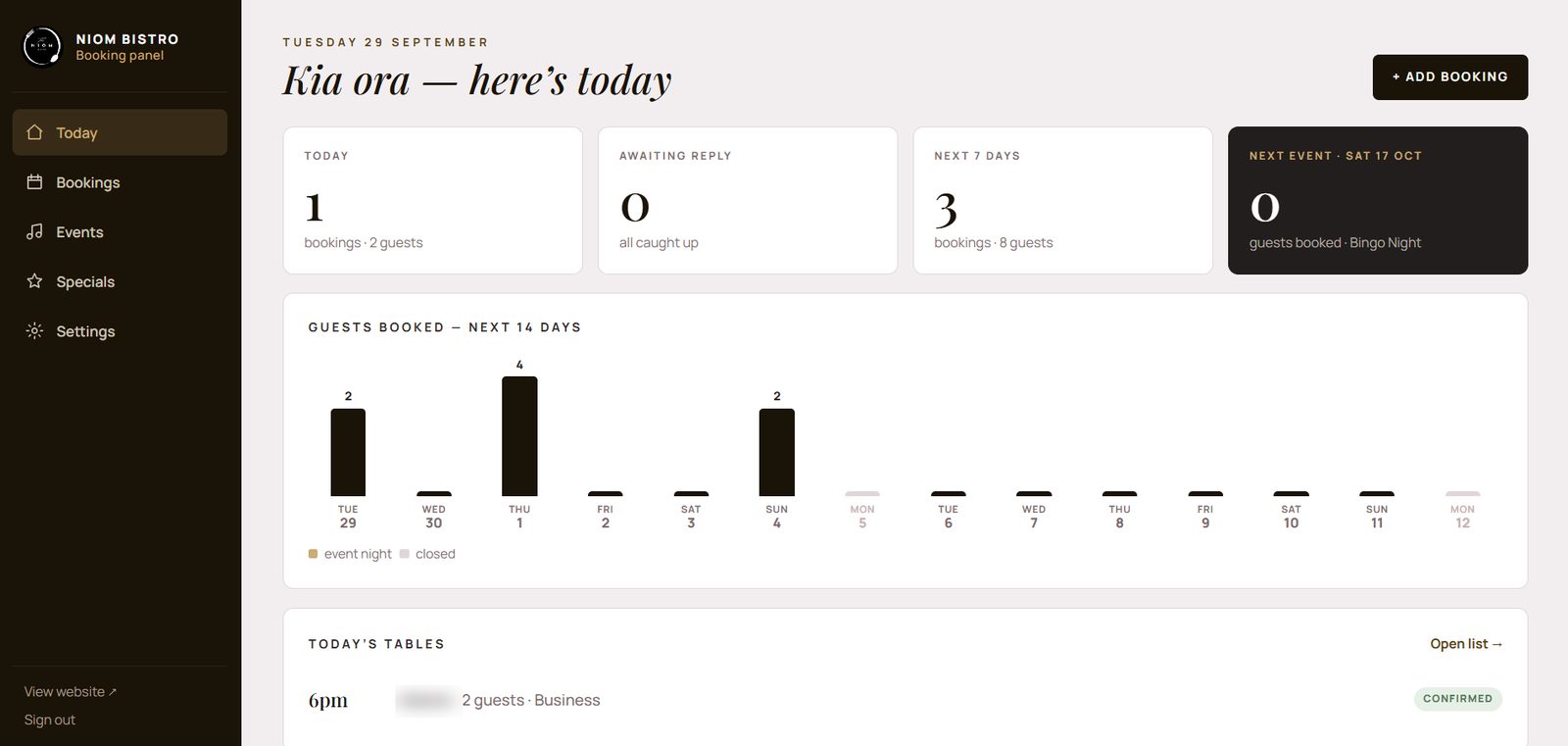
The Today screen answers the questions the kitchen and the floor ask every afternoon: how many covers tonight, is anything unanswered, what is coming this week, and how the next event is filling. The bar chart shows guests booked for the next 14 days, with event nights highlighted and closed days greyed, so a quiet Thursday and a full bingo Saturday are visible at a glance. Tonight's tables are listed underneath with their status.
2. Bookings — confirm, message, done
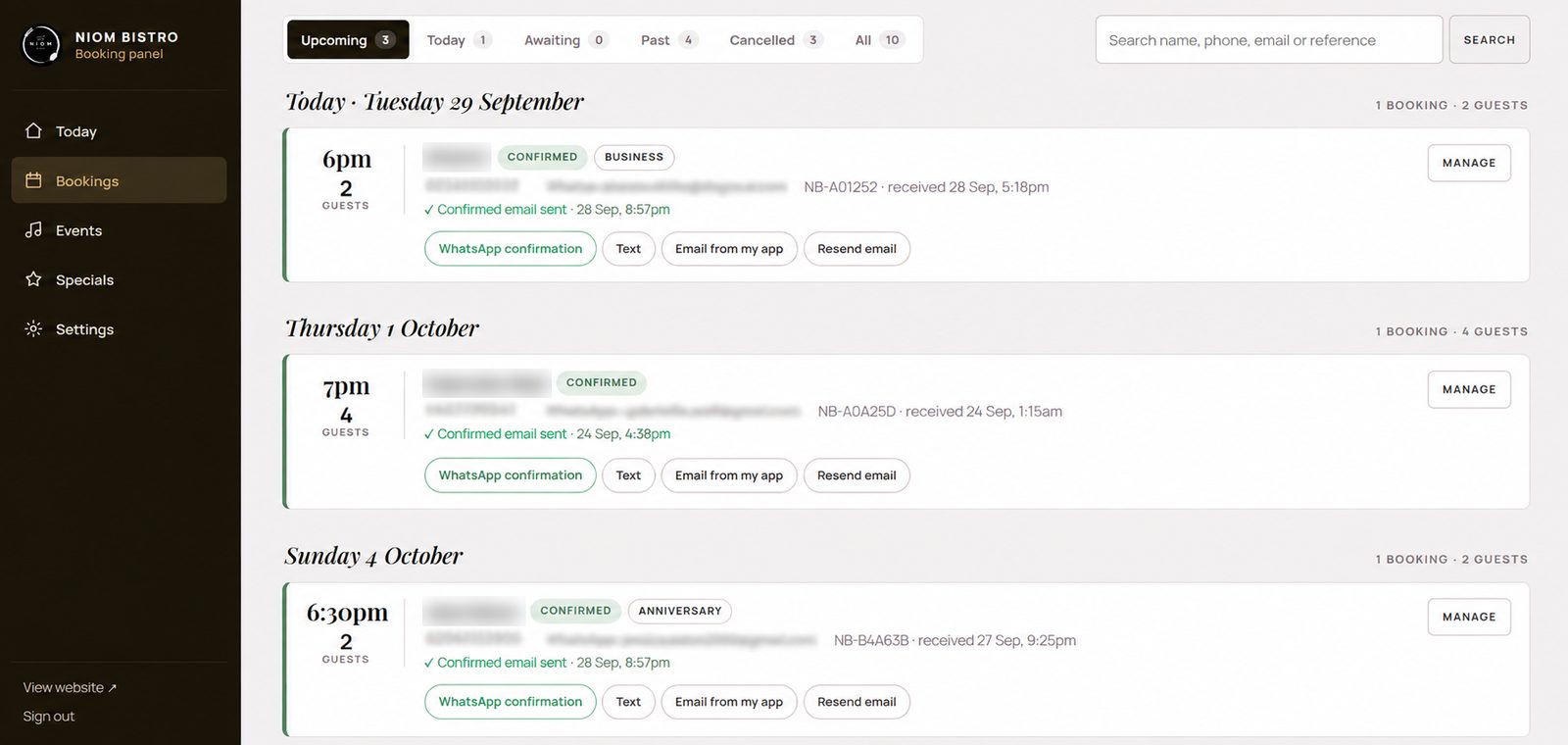
Every booking from the upgraded website form lands here with a reference number (NB-A01252), the occasion the guest chose (business, anniversary, event), and the time it arrived. Filters split them into upcoming, today, awaiting reply, past and cancelled, and a search finds any name, phone or reference. Confirming is one tap. The panel then records exactly when the confirmation email went out — "Confirmed email sent · 28 Sep, 8:57pm" — which ends the "did they get it?" question.
Under each booking sit the ways to reach the guest: a pre-written WhatsApp confirmation, a text, an email from the manager's own mail app, and resend. Confirmations go out from booking@niombistro.co.nz through the restaurant's own mailbox, so they arrive with the Niom Bistro name and pass Gmail's checks instead of landing in spam — and an optional table number can be included.
3. Events — add once, everywhere updates
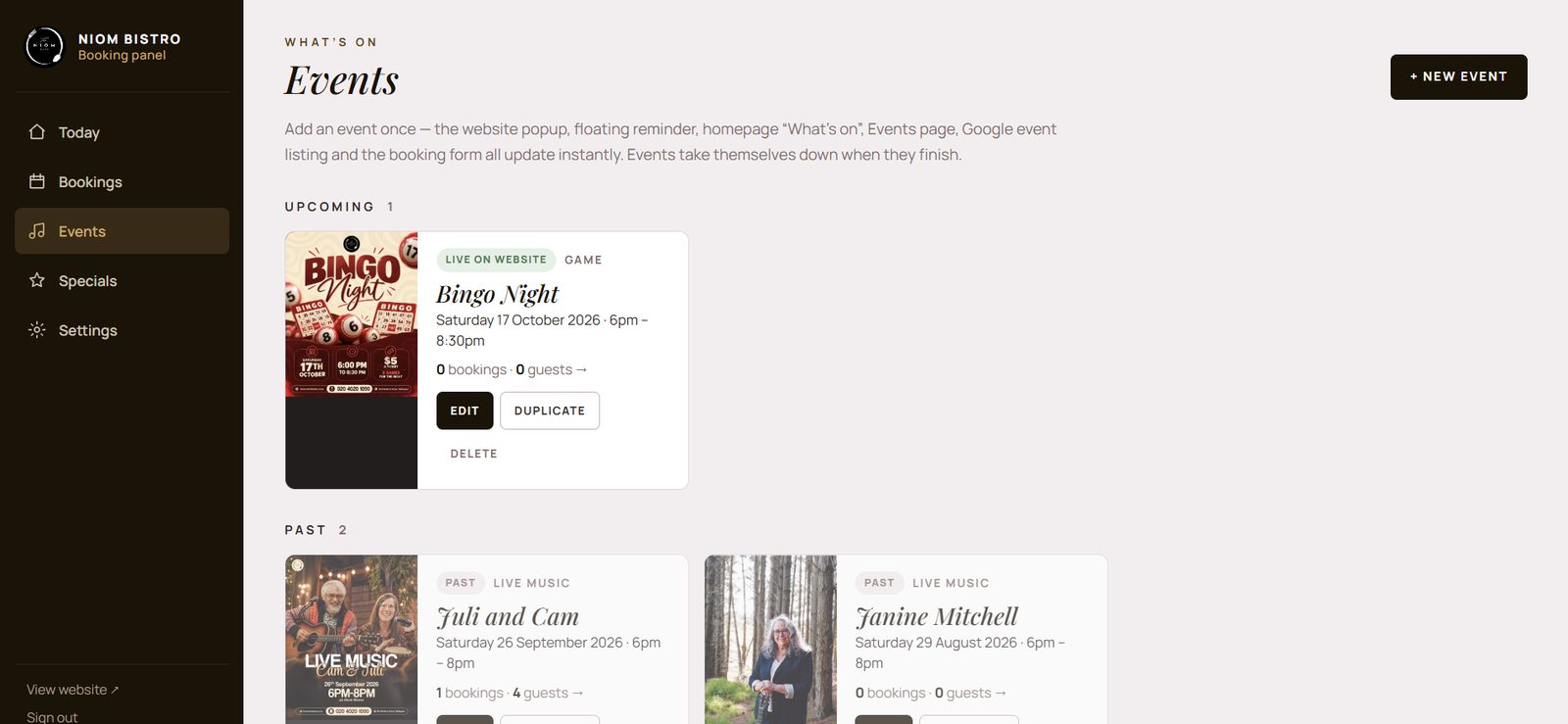
An event is added once — poster, date, time, type — and the website popup, the floating reminder, the homepage "What's on", the Events page, the Google event listing and the booking form all update instantly. Each event shows how many bookings and guests it has, so the owner knows whether Bingo Night needs a push on Facebook. Events take themselves down when they finish and move to the past list; Duplicate turns last month's live music night into next month's in seconds.
Also in the panel
- Specials editable by the team, shown directly under the homepage hero where diners see them.
- Settings for opening hours, closed days, the sending mailbox (SMTP) and the confirmation wording.
- Menu with images, faster loading, an opening logo animation — the front-end upgrades delivered alongside.
- Mobile-first — staff use it between tables, so every screen was fixed and re-tested on a phone.
How it was delivered
Because the site was live and running ads, every release was an "updated files only" package — never a full replacement — so the site was never down and bookings never stopped. Two real-world issues came up after launch and were fixed the same way: confirmation emails not reaching customers (solved by sending through the restaurant's mailbox with SMTP settings inside the panel) and a couple of admin screens that misbehaved on mobile.
What changed
Bookings are confirmed in minutes instead of "when someone checks the inbox", events go up the day they are planned, the specials on the site are the specials on the board, and the restaurant no longer needs a developer for day-to-day changes. The panel runs on the same hosting as the website; there is no subscription and no per-booking fee.
"The goal was never a big system. It was one screen the team opens on a phone that removes three recurring jobs."
Would this work for your restaurant?
If your bookings arrive by email, your events depend on a designer, and your specials are out of date, yes — and it is a fixed-scope build, not a retainer. See admin panels, price it with the cost calculator, or read the industry guide: restaurant booking admin panels — problems and the fix. We also work in Auckland hours for New Zealand clients.